In This Blog:
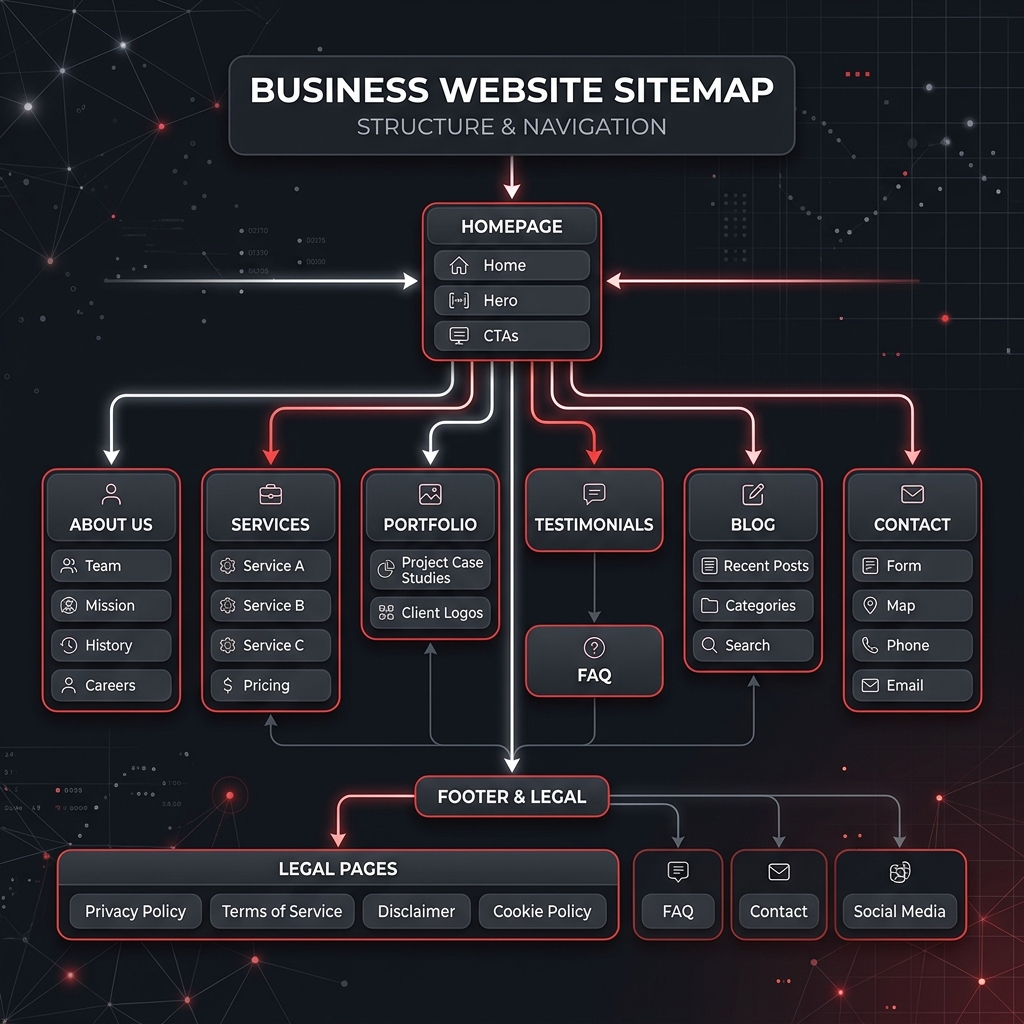
• The real-world strategy behind your website structure | • Detailed breakdown of all 10 essential sections | • Which pages you might be skipping | • Interactive PDF-ready checklist for your next build
Table of Contents
- Why Having the Right Website Pages Every Business Needs Changes Everything
- Page #1 — Homepage (Your Most Important Page)
- Page #2 — About Page (Your Trust-Building Page)
- Page #3 — Services Page (Your Sales Page)
- Page #4 — Portfolio or Work Page (Your Proof Page)
- Page #5 — Testimonials Page (Your Trust Page)
- Page #6 — FAQ Page (Your Time-Saving Page)
- Page #7 — Blog Page (Your SEO and Authority Page)
- Page #8 — Contact Page (Your Conversion Page)
- Additional Pages Worth Considering for Your Business Type
- Do Not Forget — Legal Pages Every Website Needs
- The Complete Must-Have Pages Checklist
- Every Page Has a Job — Make Sure Yours Are Working
- Frequently Asked Questions (FAQ)
Why Having the Right Website Pages Every Business Needs Changes Everything
One of the first conversations we have with almost every new client is about pages. "What pages do I need on my website?" is one of the most common questions we get — and it is a great question, because most businesses either have too few pages and miss important opportunities, or they add random pages that serve no real purpose.
In our 3 to 5 years building custom websites for small businesses and startups across India and internationally, we have noticed a pattern: clients rarely know how to organize their content. Guiding them through their website page structure has become a core, essential part of our consultation process. Whether you are building a website for a clinic, a salon, a consultancy, a restaurant, or a retail startup, the pages on your website are not just static blocks of text. They are each designed to do a specific job: attract visitors, build trust, explain your offering, and convert interest into enquiries or sales.
In this guide, we walk you through the primary must-have pages for business website structures, explaining exactly what each one must include to work as hard as you do.
Page #1 — Homepage (Your Most Important Page)
This is the page that does the heavy lifting. In our professional experience, the homepage is the single most important page on any business website. It is usually the first page a visitor sees — and it has one job above all others: to immediately tell the visitor who you are, what you do, and what they should do next. If a visitor cannot figure that out within five seconds of landing on your homepage, they will leave.
When we design a homepage, we think of it as a 10-second pitch. If the visitor does not understand your value and feel compelled to stay or act within those 10 seconds, the page needs work. Everything else on the homepage supports that single goal.
A high-converting homepage must include:
- HEADLINE: A clear, benefit-driven statement that tells visitors exactly what you do and who you do it for (e.g., "Professional Websites for Growing Businesses Across India"). Avoid generic statements like "Welcome to Our Website."
- SUBHEADLINE: One or two sentences expanding on your headline that briefly explains how you help and what makes you different.
- PRIMARY CALL TO ACTION (CTA): One clear button above the fold (visible without scrolling) such as "Get a Free Quote", "Book a Consultation", or "View Our Work". Do not clutter the screen with three different actions.
- SERVICES OVERVIEW: A brief visual summary of your main services, linking through to the full Services page.
- SOCIAL PROOF: Client logos, star ratings, or a short testimonial visible immediately on the homepage. Trust signals above the fold dramatically improve conversions.
- SECONDARY CTA: A second CTA further down the page for visitors who scroll before deciding (e.g., "See Our Portfolio").
Expert Action Item:
Place a prominent, high-contrast primary CTA button above the fold of your homepage to give visitors a clear action step instantly.
Page #2 — About Page (Your Trust-Building Page)
Most businesses treat their About page as a formality — a brief history of the company and a generic team photo. In reality, the About page is one of the most visited pages on any business website, and one of the most powerful trust-building tools you have. Visitors go to your About page when they are seriously considering working with you. They want to know: are these real people? Do they know what they are doing? Can I trust them with my money?
Reframe the About page away from "about us" toward "about what we can do for you." Frame your team's background as the exact reason you are qualified to solve the client's problems.
A strong About page must include:
- Your Story: How and why you started, told in a human, relatable, and authentic way.
- Your Mission or Values: What you stand for beyond making money.
- Your Team: Real names, real photos, and brief personal bios. Using stock photos of "team members" destroys trust immediately.
- Experience & Credentials: Years in business, clients served, and notable certifications.
- Founder's Message: A short paragraph from the founder makes the business feel human and approachable.
For clinics and healthcare businesses, the About page often becomes the most important trust page on the site — patients want to know the doctor's qualifications, experience, and approach before booking. For consultants, it is where credibility is won or lost.
Expert Action Item:
Replace all stock images of team members with real, high-quality photos of your actual founders and staff to maintain credibility.
Page #3 — Services Page (Your Sales Page)
Your Services page is not just a list of what you offer — it is your primary sales page. It needs to explain not just WHAT you do, but WHO it is for, HOW it works, and WHY someone should choose you over a competitor. If you treat it as a passive list, you are leaving conversions on the table.
We always advise clients to give each major service its own space on the website. A clinic that lists "Cardiology, Orthopaedics, Dermatology" in one sentence is leaving enormous SEO value — and patient trust — on the table. Each major service should have its own details, benefits, and focused CTA.
A strong Services page must include:
- Service Detail: A dedicated section or sub-page for each main service — do not list ten services in one paragraph.
- Key Benefits: Focus on what the client gets (results) rather than just the technical features of the service.
- The Process: A brief 3-step or 4-step explanation of how the service works from starting to delivery.
- Pricing Transparency: A starting price or typical range if possible. Hiding price entirely frustrates visitors and reduces enquiries.
- Direct Service CTA: A dedicated link or button like "Enquire About This Service" for every option.
For example, salons need clear categories (hair, skin, nails) with sub-services. Consultants should outline deliverables for each consulting area. Restaurants must link to an easy-to-read, downloadable menu page. Web design agencies should give dedicated sections to design, development, SEO, and maintenance.
Expert Action Item:
Add starting prices or a typical price range to your services to filter out unqualified leads and save valuable sales call time.
Page #4 — Portfolio or Work Page (Your Proof Page)
For any business where the quality of your work can be shown visually, a portfolio page is not optional. It is the proof page that converts a curious visitor into a genuine enquiry. As a web design agency, showing our work is far more persuasive than anything we could say about ourselves. The same rule applies to many other industries.
A strong Portfolio page must include:
- Real Work Examples: Never use generic stock images. Show your actual completed projects.
- Project Context: Briefly state the client's industry, the challenge they faced, what you delivered, and the results achieved.
- High-Quality Visuals: Poor quality screenshots or photos undermine trust, regardless of how good the actual work was.
- Categorization: Organized by industry or project type if you work across multiple niches.
- Inline Testimonials: A quote from the client placed right next to their project thumbnail.
- Focused Bottom CTA: A clear next step (e.g., "Like What You See? Let's Talk").
Which businesses need a portfolio page? Web designers, interior designers, architects, photographers, videographers, salons (showing before/after photos), and clothing brands. If you are in clinics, accounting, or consulting, written case studies focusing on customer results, team profiles, and facility photos work much better than a visual portfolio.
Expert Action Item:
Add a brief three-sentence context block (Challenge, Solution, Result) for every project in your portfolio instead of just posting photos.
Page #5 — Testimonials Page (Your Trust Page)
Social proof is one of the most powerful forces in purchasing decisions. A dedicated Testimonials page — or a prominent testimonials section on your homepage — tells potential customers: real people have trusted this business and had a great experience. This is a page most clients initially say they do not need. It is almost always one of the first things we recommend adding to complete a strategic website pages structure.
Fake or vague testimonials ("Great company! — John D.") do more harm than good in 2026. Visitors can spot them instantly and it destroys the trust you were trying to build. Real, specific, attributed testimonials are the only ones worth publishing.
A strong Testimonials page must include:
- Full Attributions: Real testimonials with full name, role, and location — not just initials.
- Client Photo: A photo of the client where possible, which dramatically increases trust.
- Specific Results: Testimonials that mention results (e.g., "Our enquiries doubled in 3 months") are far more powerful than "Very happy with the work."
- Video Testimonials: If available, video is the highest-converting review format.
- Google Reviews Embed: Embedding live reviews shows they are publicly verified.
- Actionable CTA: Close the page with "Ready to See Results Like These? Talk to Us".
Expert Action Item:
Embed a Google Reviews widget directly on your testimonial section to show that your customer feedback is verified and public.
Page #6 — FAQ Page (Your Time-Saving Page)
An FAQ page serves two purposes that most business owners do not consider: it saves you time by answering common questions before a client even contacts you, and it is one of the best pages for appearing in Google's featured snippet results at the top of search pages, driving massive free search traffic to your domain.
A strong FAQ page must include:
- Real Customer Questions: The 10–15 most common questions your customers actually ask (not questions you wish they would ask).
- Clear, Direct Answers: Keep answers concise and direct. Avoid sales language or fluff.
- Categorization: Group questions into categories (Pricing, Process, Timeline, Services) for easy scanning.
- Schema Markup: Ask your developer to add FAQ Schema code, which makes your questions appear directly in Google search results.
For example, a clinic FAQ should cover insurance and walk-ins. A salon FAQ might explain treatment timelines. A web agency FAQ covers timeline, payment plans, and assets needed. A consultant FAQ describes engagement models and startup services.
Expert Action Item:
Write down the top 10 questions your customer support team receives this week, and make those the core of your new FAQ page.
Page #7 — Blog Page (Your SEO and Authority Page)
A Blog page is the single best long-term investment you can make in your website's visibility on Google — and one of the pages most business owners delay indefinitely, telling themselves they will start it "later." Later rarely comes. We include a Blog page as standard on every website we deliver. Even if a client is not ready to start blogging immediately, having the page ready means they can begin whenever they choose — without needing to pay for new layouts.
Every blog post is a new page that Google can rank. More posts mean more keywords you can rank for, leading to high-quality leads who already respect your expertise. Plus, blog articles can easily be repurposed into social media posts, email newsletters, and video scripts.
A strong Blog page must include:
- Clean Grid Layout: Show blog titles, dates, categories, and featured images in an organized manner.
- Consistent Schedule: Publishing once or twice a month consistently is far better than a burst of ten posts followed by six months of silence.
- Search Intent Content: Write content that answers the exact questions your target customers are searching on Google.
- Internal Linking: Link your blog posts to relevant service and contact pages to guide readers down the sales funnel.
- Subscription CTA: Add a simple newsletter form like "Get new articles straight to your inbox."
Expert Action Item:
Set a strict editorial schedule of publishing just one high-quality, SEO-focused blog post every two weeks to start building domain authority.
Page #8 — Contact Page (Your Conversion Page)
Your Contact page is where interest becomes action. A visitor who reaches your Contact page is already considering working with you — and a poor contact page can lose them at the last moment. Friction kills conversions. If you make it difficult to get in touch, visitors will simply move on to the next business.
Common mistakes we flag include: only listing an email address with no contact form, forms with more than 6-7 fields, and lacking a WhatsApp option. For businesses serving customers in India and internationally, a direct WhatsApp link is essential.
A strong Contact page must include:
- Short Contact Form: Keep it simple — name, email, phone, and a brief message. Every extra field reduces submissions.
- Multiple Contact Methods: Click-to-call phone number, email address, physical address with a Google Maps embed, and a WhatsApp business link.
- Expected Response Time: Setting expectations (e.g., "We typically respond within 24 hours") reduces anxiety.
- Business Hours: Clear operating hours and days.
- Warm Headline: Try "Let's Build Something Great Together" instead of a boring "Contact Us".
- CAPTCHA: Protect your form from automated spam bots.
Expert Action Item:
Limit your contact form to a maximum of 4 fields (Name, Email, Phone, Message) to maximize submission rates.
Additional Pages Worth Considering for Your Business Type
Beyond the core pages every business needs, certain industries benefit significantly from additional dedicated pages. Including these shows you understand your specific market deeply and builds quick authority with your visitors.
Here are the most impactful ones based on business type:
- CLINICS & HEALTHCARE: Individual doctor profile pages showing qualifications, specialities, and approach; an online appointment booking page to reduce phone workload; and a patient resources health tips section.
- SALONS & BEAUTY: A before/after gallery page (the highest-converting content for salons); an online booking page; and a clear price list page.
- CONSULTANTS & PROFESSIONALS: A detailed case studies page showing specific client project outcomes; a speaking/media page; and free guides or templates as lead magnets.
- RESTAURANTS: A mobile-optimized, downloadable menu page; a reservation booking form; and an events page for special occasions or private bookings.
- WEB DESIGN AGENCIES: A step-by-step process page; an approximate pricing range page; and a client portal login link.
Expert Action Item:
Add an online scheduling link (like Calendly) if you are a consultant or service provider to allow prospects to book directly.
Do Not Forget — Legal Pages Every Website Needs
Legal pages are the ones most business owners skip entirely — and the ones that matter most when something goes wrong. We always include a Privacy Policy page in every website we build. A website without one is not just legally exposed, it also signals to visitors that the business is not fully professional. Treat legal pages as trust and credibility signals, not just obligations.
What to include and why:
- PRIVACY POLICY: Required by law if you collect any visitor data (contact forms, cookies, and analytics all count). This is especially critical under India's DPDP Act and international regulations like GDPR. It explains what data you collect and how you use it.
- TERMS & CONDITIONS: Defines the rules of engagement for using your website and services, protecting your intellectual property and limiting liability.
- COOKIE POLICY: Required if you use tracking technologies like Google Analytics or Meta Pixels. Include a simple consent banner.
- REFUND / CANCELLATION POLICY: Especially important for e-commerce, software, and booking-based service businesses to avoid credit card chargeback disputes.
Expert Action Item:
Add a simple footer link to a Privacy Policy page to ensure your contact forms comply with basic digital privacy laws.
Complete Website Pages Checklist
Reviewing your current site or building a new one? Use this comprehensive checklist to make sure you have every page planned strategically. Click the checkboxes to track your progress.
Core Pages (Every Website Needs These)
- Homepage — Headline and CTA above the fold, services summary, and trust signals.
- About Page — Your human story, real team photos, and founder's message.
- Services Page — Dedicated sections per service outlining benefits and clear CTAs.
- Contact Page — Short form, phone link, address, Google Maps, and WhatsApp.
Trust & Conversion Pages
- Testimonials Page — Real, specific, attributed client reviews with photos.
- Portfolio / Work Page — Actual project examples with brief challenge/result context.
- FAQ Page — 10–15 real customer questions answered clearly without sales fluff.
Growth & Legal Pages (Non-Negotiable)
- Blog Page — Consistently updated, SEO-focused posts answering user queries.
- Privacy Policy — Legally required page detailing data collection practices.
- Terms & Conditions — Protects your business and defines website usage rules.
- Cookie Consent Banner — Required if using Google Analytics or Meta Pixel.
Industry-Specific Extras
- Booking / Appointment Page — For clinics, salons, and consultants.
- Before/After Gallery Page — For salons, photographers, and home designers.
- Downloadable Menu Page — For restaurants and dining setups.
- Case Studies Page — Detailed outcome documentation for consultants and agencies.
Every Page Has a Job — Make Sure Yours Are Working
A great website is not just about looking good — it is about having the right pages, each doing a specific job that moves a visitor one step closer to becoming a customer. The pages we have covered in this guide — Homepage, About, Services, Portfolio, Testimonials, FAQ, Blog, Contact, and the essential legal pages — are the foundation of a website that works as hard as you do.
In our years of building websites for businesses across India and internationally — clinics, salons, consultants, restaurants, and startups — the websites that perform best are always the ones where every page has a clear purpose and a clear next step for the visitor.
If you are not sure whether your current website has the right pages, or you are starting from scratch and want to get it right from day one, we would love to help you plan it properly. Let's make sure your digital presence represents your business at its absolute best.