In This Blog:
• What is SSL? | • Why Every Site Needs It | • The Not Secure Warning | • SEO Advantages | • Free vs. Paid SSL | • Expiry & Auto-renewal | • India's DPDP Act Compliance | • 60-Second Check Audit
Table of Contents
- What is SSL — In Plain English?
- Why Every Website Needs SSL — Not Just Online Shops
- What Actually Happens to a Website Without SSL?
- Free SSL vs. Paid SSL — Is There a Real Difference?
- How to Check if Your Website Has SSL Right Now
- The SSL Expiry Problem Nobody Warns You About
- SSL and India's Data Privacy Law — What Business Owners Should Know
- SSL Action Plan — What to Do Today
- Interactive SSL & Website Security Checklist
- Frequently Asked Questions
When we build a new website for a client — whether it is a clinic, a salon, a consultant, or a startup — one of the first things we set up before the site goes live is an SSL certificate.
Most clients at this point ask one of four questions: "What is SSL?" — or — "Do I really need it if I am not selling anything?" — or — "Is the free version actually secure?" — or — "My current website doesn't have it — is that a problem?"
The answer to all four is important. This guide explains SSL in plain English — what it is, why every website needs it, what happens without it, and how to make sure yours has it set up correctly.
What is SSL — In Plain English?
SSL stands for Secure Sockets Layer. But you do not need to remember that. What you do need to know is what it does — and you have already seen it thousands of times.
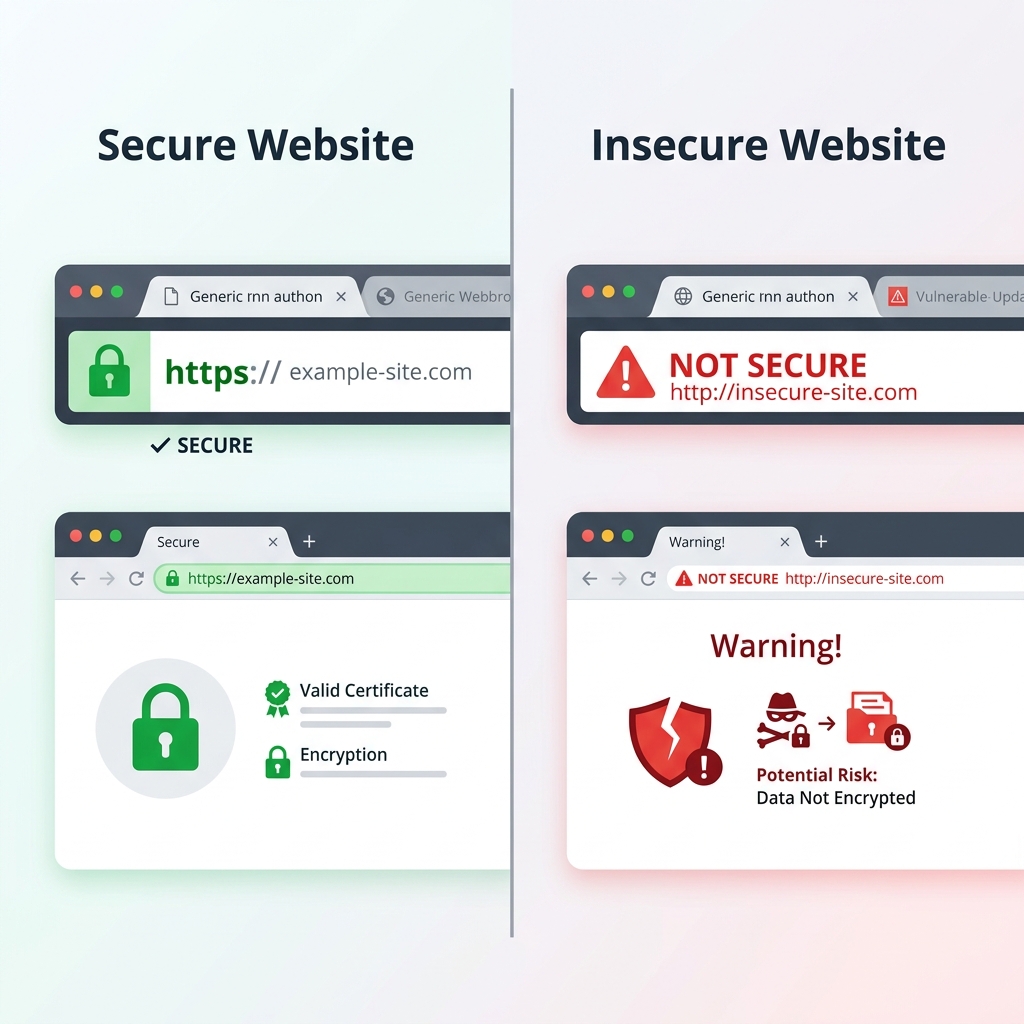
When you visit a website and see a padlock icon in the address bar of your browser — next to the website address — that padlock means the website has an SSL certificate installed. The website address will also begin with HTTPS rather than HTTP — that "s" stands for secure.
What SSL actually does is encrypt the connection between your visitor's browser and your website. Think of it like sending a letter in a sealed, tamper-proof envelope rather than on an open postcard.
Without SSL, any information a visitor sends through your website — a contact form submission, a name, an email address, a phone number — travels across the internet in plain text. Anyone with the right tools in the middle of that connection can read it.
With SSL, that same information is scrambled into unreadable code during transmission — and can only be decoded by your website's server at the other end.
The Sealed Envelope Analogy:
Imagine writing down your phone number and address on a postcard and dropping it in the mail. Anyone carrying that postcard from the mailbox to your home can look at it. That is HTTP. Now, imagine putting that same paper inside a secure, heavy-duty tamper-proof envelope that can only be cut open by the recipient. That is HTTPS, secured by an SSL certificate.
Key Takeaway:
SSL protects the privacy of data moving between the user and your website. If your site has forms of any kind, SSL is the virtual envelope that keeps those entries private.
Why Every Website Needs SSL — Not Just Online Shops
The single most common SSL misconception we encounter is: "I do not take payments online, so I do not need SSL." This is not true — and it is one of the most important things to correct before a website goes live. Here is why every website — regardless of whether it sells anything — needs SSL:
Reason 1 — Google Flags Your Site as 'Not Secure'
Since 2018, Google Chrome — the world's most used browser — displays a "Not Secure" warning in the address bar for any website without SSL. This warning is visible to every single visitor before they read a word of your content.
Imagine a potential customer searching for your business, clicking your link, and being greeted with a warning label before they see your services, your team, or your contact details. Many will leave immediately — not because your business is untrustworthy, but because your website told them it might be. We explain this to every client who questions whether they need SSL — because no amount of good design or great content can overcome a trust warning displayed by the browser itself.
Reason 2 — Google Ranks HTTPS Websites Higher
Google uses HTTPS as a ranking signal. Websites with SSL rank higher in Google search results than equivalent websites without it. For a business investing time and money in SEO — not having SSL is actively working against your rankings. It is a small factor — but in a competitive local market, every advantage matters.
Reason 3 — Contact Forms Transmit Data Insecurely Without SSL
If your website has a contact form — and almost every business website does — the name, email, phone number, and message that visitors submit travel across the internet when they hit send. Without SSL, that data travels unencrypted. Your visitors are trusting you with their personal information when they fill in your form. SSL is how you honour that trust — and in an era of increasing data privacy awareness, it is the minimum standard visitors expect.
Reason 4 — Professional Credibility
In 2026, a website without SSL is like a business without a proper signboard. It signals that the business has not kept up with basic digital standards — and raises questions about what else might have been overlooked. A padlock in the browser is a small thing — but it is noticed, consciously or unconsciously, by every visitor to your website.
What Actually Happens to a Website Without SSL?
Here is the practical reality of running a website without SSL in 2026 — across every major browser and search engine:
- In Google Chrome: The address bar shows 'Not Secure' next to your website URL. Visitors see this warning before any of your content loads. Some visitors will leave immediately without scrolling.
- In Firefox and Safari: Similar security warnings are displayed. No major browser treats non-SSL websites as trustworthy in 2026.
- In Google Search Results: Your website ranks lower than HTTPS competitors for the same keywords. Google's algorithms deprioritise non-secure websites as part of its commitment to a safer web.
- For Your Contact Forms: Form submissions travel unencrypted across the internet. Personal data shared by visitors is potentially exposed. In India, this creates legal liability under the DPDP Act (Digital Personal Data Protection Act).
- For Your Business Reputation: Visitors who notice the 'Not Secure' warning associate it with the business, not just the website. Once trust is lost at the browser level, it is very hard to recover within that same visit.
"Every day a business website runs without SSL is a day it is actively telling visitors — and Google — that it cannot be trusted. That is a problem no business can afford."
Free SSL vs. Paid SSL — Is There a Real Difference?
Another question we hear regularly: "Is the free SSL certificate as secure as a paid one?" For the vast majority of business websites — yes, it is. Here is the honest breakdown:
Free SSL (Let's Encrypt)
Provided free by a non-profit certificate authority called Let's Encrypt — backed by major organisations including Mozilla, Google, and Cisco. It offers full 256-bit encryption — identical to paid SSL for the purpose of securing website connections. It is available through most reputable hosting providers at no extra charge, and renews automatically every 90 days if auto-renewal is set up correctly. It displays the same padlock in the browser as any paid SSL. It is suitable for informational websites, service businesses, blogs, portfolios, and most small business websites.
Paid SSL (Extended Validation / Organisation Validated)
Costs ₹2,000 – ₹15,000+ per year depending on the type and provider. It includes additional identity verification by the certificate authority — confirming that the business is legally registered and verified. Historically, it showed a green address bar with the company name, though most browsers have since removed this visual indicator. It is suitable for large financial institutions, banks, payment gateways, and enterprises handling sensitive financial data.
Honest Recommendation
For the overwhelming majority of small and medium business websites in India — a free Let's Encrypt SSL certificate is completely sufficient. The encryption strength is identical. The padlock looks identical. The Google ranking benefit is identical.
We use Let's Encrypt for every website we build — and set up auto-renewal so our clients never have to think about it. It just works, permanently, in the background.
How to Check if Your Website Has SSL Right Now
Not sure if your current website has SSL? Here is how to check in under 60 seconds:
Method 1 — Look at Your Browser
Open your website in any browser. Look at the address bar. Do you see a padlock icon and "https://"? If YES, your SSL is active. Do you see "Not Secure" or just "http://"? If NO, your website does not have SSL.
Method 2 — Use a Free Online Checker
Go to the free testing tool whynopadlock.com and enter your website URL. It will tell you instantly whether your SSL is active, and flag if there are any mixed content issues on specific pages.
Method 3 — Check Every Page — Not Just the Homepage
SSL must be active on every page of your website — not just the homepage. Navigate to your Services page, Contact page, and Blog page, and check if the padlock is showing on each one. A padlock on the homepage but "Not Secure" on other pages means your SSL setup is incomplete.
What to do if SSL is missing:
- Contact your hosting provider. Most reputable hosts offer free Let's Encrypt SSL installation.
- Ask your web developer to install and configure SSL if your host does not provide it automatically.
- Ensure HTTPS redirect is set up — so anyone visiting the HTTP version is automatically sent to HTTPS.
- Check for mixed content after installation. Images or scripts loading over HTTP on an otherwise HTTPS page will still trigger browser warnings.
When we take on a project where the client has an existing website without SSL, fixing it is always one of the first things we do — before anything else. The impact on visitor trust and Google rankings is immediate.
The SSL Expiry Problem Nobody Warns You About
Here is something many business owners with SSL discover the hard way: SSL certificates expire. A free Let's Encrypt certificate expires every 90 days. A paid certificate typically expires every 1–2 years.
When an SSL certificate expires, every visitor to your website is immediately shown a full-screen browser warning: "Your connection is not private" — far more alarming than the 'Not Secure' label of a website without SSL. This has happened to well-known Indian businesses, government websites, and large organisations — and it can happen to yours if auto-renewal is not set up correctly.
To avoid SSL expiry: for Let's Encrypt, auto-renewal should be configured at the hosting level so that the certificate renews automatically every 90 days without any manual action required. Most reputable hosting providers handle this automatically, but you should verify auto-renewal is active rather than assuming it is. For paid SSL, set a calendar reminder 30 days before the expiry date. Many certificate providers send renewal reminders by email, so ensure these go to an actively monitored inbox. Alternatively, consider switching to Let's Encrypt for simplicity.
For every website we build, we configure SSL auto-renewal from day one — so our clients never face the nightmare of a full-screen security warning greeting their visitors. It is a small setup step that prevents a very large problem.
SSL and India's Data Privacy Law — What Business Owners Should Know
India's Digital Personal Data Protection Act (DPDP Act), which came into force in 2023, places clear obligations on businesses that collect personal data from individuals — including names, email addresses, and phone numbers collected through website contact forms.
While the DPDP Act does not specifically mandate SSL, it requires businesses to implement reasonable security safeguards to protect personal data during collection and transmission.
Operating a website without SSL — and therefore transmitting contact form data in plain, unencrypted text — would be difficult to defend as a "reasonable security safeguard" under this framework.
For Indian businesses serving Indian customers, SSL is not just a technical best practice — it is part of responsible, legally aware data handling.
SSL Action Plan — What to Do Today
Here is everything you need to do to ensure your website has SSL set up correctly — and stays that way:
- Step 1 — Check Your Current Status: Open your website and look for the padlock in the browser. Use whynopadlock.com for a full SSL audit. Check every key page — not just the homepage.
- Step 2 — If SSL is Missing — Fix It: Contact your hosting provider for free Let's Encrypt SSL. Ask your web developer to install and configure it. Ensure HTTP to HTTPS redirect is in place and check for mixed content.
- Step 3 — Verify Auto-Renewal is Active: Confirm with your hosting provider that auto-renewal is configured for your SSL certificate. Do not assume — verify and get confirmation.
- Step 4 — Check Annually: Once a year, run a fresh whynopadlock.com check. Confirm the padlock is showing on all key pages and review your hosting account to confirm renewal history.
If any of these steps feels overwhelming or technical — that is exactly what a professional web agency handles for you. SSL should be invisible to a business owner — set up correctly, renewed automatically, and never thought about again.
Explore More Web & Marketing Resources:
- 👉 Website Security Basics Every Business Owner Should Know
- 👉 Why Every Business Needs a Professional Website in 2026
- 👉 How to Rank Your Business on Google's First Page
- 👉 Local SEO Guide for Small Businesses in India
- 👉 What is a Sitemap and Why Does Your Website Need One?
- 👉 How to Generate Leads Through Your Business Website
- 👉 Ready for a secure web presence? Check out our Custom Web Development Services.
The Padlock is Small — The Trust it Builds is Not
SSL is one of the simplest, least expensive, and most impactful things any business website can have. It protects your visitors' data, tells Google your website is trustworthy, prevents the "Not Secure" warning from greeting every visitor, and — with auto-renewal set up correctly — requires zero ongoing effort.
It is also one of the first things we check and set up on every website we build — because it is the foundation of visitor trust, and visitor trust is the foundation of every lead, every enquiry, and every sale your website generates.
Every website we deliver includes SSL, configured correctly, with auto-renewal set up — so it is one less thing our clients ever need to think about.
SSL Quick Reference Checklist for Readers
Interactive SSL Checklist
SSL Status Check
SSL Setup & Compliance
Ongoing Maintenance
India Compliance
Note: The checklist state is maintained in your browser as you click, allowing you to use this page as a live tool.